When Mesh WiFi Can Improve Home Coverage
A dependable home network should fit the building and the devices using it. A single well-placed router may suit a smaller home, while multiple access points or mesh nodes can improve coverage across a larger space. The best approach depends on placement, wiring, capacity, and the features you need.
1. Coverage Across More of Your Home
Traditional Routers
Traditional routers broadcast a WiFi signal from a single point, which can result in uneven coverage, especially in larger homes or homes with multiple floors. Dead zones—areas where the WiFi signal is weak or non-existent—are common, leading to frustration and connectivity issues.
Mesh WiFi
Mesh WiFi systems use multiple nodes to extend a network. With suitable placement and a strong backhaul connection, they can help reduce coverage gaps. Walls, distance, interference, and client capabilities still affect the result.
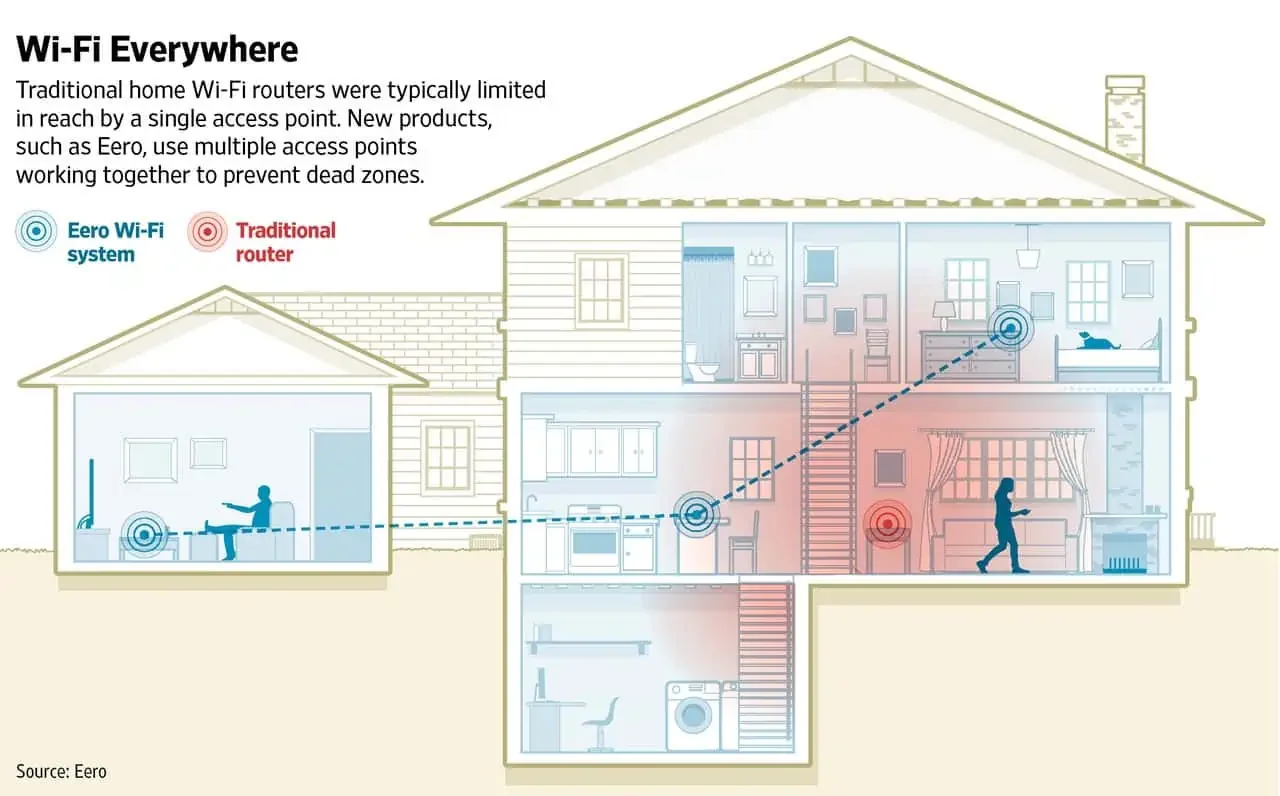
Illustrative coverage diagram. Actual results depend on the building layout, materials, access-point placement, and backhaul.
2. Easy Scalability
Traditional Routers
A router can serve additional wired access points when the hardware and wiring support them. How easy the system is to manage depends on its products and management software, rather than simply whether it is sold as a mesh kit.
Mesh WiFi
Many mesh systems make it straightforward to add compatible nodes under one network name. Each node still needs a suitable connection to the network. Roaming behavior also depends on client devices, settings, and placement; adding more nodes is not always an improvement.
3. Improved Performance and Reliability
Traditional Routers
The performance of a traditional router can degrade as you move further away from the device. Obstacles such as walls, floors, and furniture can weaken the signal, resulting in slower internet speeds and potential disconnections.
Mesh WiFi
Additional well-placed nodes can improve coverage, but wireless backhaul shares radio capacity and can become a bottleneck. Many consumer mesh systems also support Ethernet backhaul. For example, eero documents wired backhaul for compatible models. Compare the actual hardware and wiring options before choosing a system.
4. User-Friendly Management
Traditional Routers
Router management varies by product. Some standalone routers provide straightforward apps and automatic updates; others offer more detailed controls that need careful configuration.
Mesh WiFi
Mesh WiFi systems typically come with intuitive mobile apps that make network management easy and accessible. These apps allow you to set up your network, manage connected devices, create guest networks, and implement parental controls with just a few taps. Some products offer automatic updates. Confirm the support period, update settings, and account protections; updates do not eliminate every security risk.
5. Enhanced Smart Home Integration
Traditional Routers
A standalone router’s capacity depends on its hardware, radio design, traffic load, and clients. A device-count claim alone does not show whether it will meet your household’s needs.
Mesh WiFi
Mesh systems can help distribute devices across more access points, but performance still depends on hardware, client load, interference, and backhaul. Check device compatibility and coverage at the locations where smart-home equipment will operate.
Conclusion
Mesh can be a practical coverage option, especially where running cable is difficult. A single access point can suit a smaller property, while a network with wired access points may better fit larger spaces or more demanding requirements.
Choose a network around the space and how you use it. Evaluate coverage, backhaul, device compatibility, management features, and support needs before replacing equipment that may already be adequate.
---
For more information or assistance in choosing the right mesh WiFi system for your home, feel free to contact our experts at The SmartHome Co. We’re here to help you make the best choice for your connected lifestyle.